 AIm
AIm
How to add OAuth 2.1 to an MCP server using Supabase
A remote MCP server that needs authentication needs OAuth to be listed in an assistant directory, and you probably do not have to build the authorization server. Supabase ships one, it is switched off by default, and three settings turn it on. What is left for you is a consent page and a way to map the platform user onto your own user row. Here is that route, in the order you would build it.
The route, at a glance
Before any of the detail, the shape of it. Six things happen, and the authorization server does the middle of it for you:
| Step | Who does it |
|---|---|
| Client posts to your MCP endpoint with no credential, gets 401 and a pointer | You |
| Client reads your protected-resource document, finds the authorization server | You serve one small JSON file |
| Client registers itself and starts an authorization with PKCE | The platform |
| User approves on a consent screen | You |
| Code is exchanged for an access token | The platform |
| Client calls your MCP endpoint again, with the token | You verify it and resolve the user |
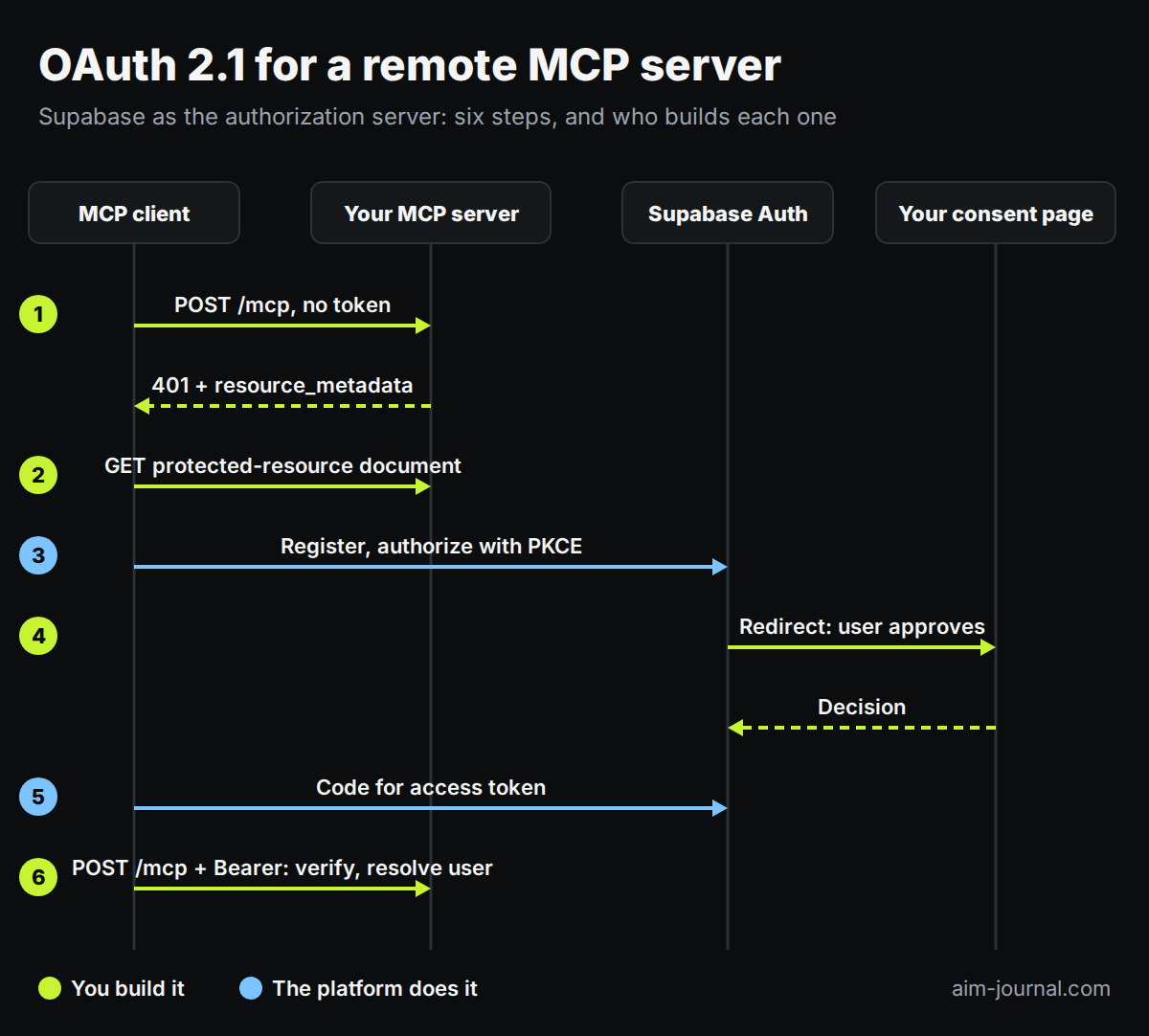
Take a training log as the example, since that is the server this was written from. Every tool on it reads or writes one person's sets and weights, so the only thing standing between two users' data is that the token resolves to exactly one row and every tool stays scoped by it. Whatever your server holds, that is the line worth being paranoid about, and the section on resolving the caller is where you win or lose it.
Why an MCP server suddenly needs OAuth
Section 5.D of Anthropic's Software Directory Policy is short and unambiguous: remote MCP servers that connect to a remote service and require authentication must use secure OAuth 2.0 with certificates from recognized authorities. The policy governs the directory that lists both plugins and connectors, so a server that authenticates some other way is not rejected on quality. It is simply not eligible. Check the current wording before you plan around it; that document has already been consolidated once.
The common other way is a long secret in the URL path. Most remote MCP servers in the wild still work like that, and it is a reasonable first shipping decision. It is also not OAuth by any reading, so at some point it stops being a shortcut and starts being a wall.
On the version number: the policy asks for OAuth 2.0, and what the platform implements is OAuth 2.1, which is a tightening of the same framework rather than a different one. Mandatory PKCE and no implicit grant are the parts you will notice. Meeting 2.1 meets the requirement.
Start at the 401, because that is where the client starts
A client that has only your server address and no configuration has to be able to find everything else. That discovery begins with the response to an unauthenticated request, so this is the first thing to get right and the easiest to get wrong.
HTTP/1.1 401 Unauthorized
www-authenticate: Bearer resource_metadata="https://example.com/.well-known/oauth-protected-resource"
That pointer names a document defined by RFC 9728. It is the only document in the discovery chain you have to serve yourself; the rest is forwarded from the authorization server. That is not the same as being your only obligation, since you also have to issue this challenge correctly, verify the token, and answer a missing credential differently from an insufficient one. It is small:
{
  "resource": "https://example.com/mcp",
  "authorization_servers": ["https://example.com/auth/v1"]
}
Your own app will intercept this if you let it. Two layers do the same damage, and they are the same mistake twice, so fix them together:
- A catch-all route. If your MCP endpoint shares a domain with a single-page app, the SPA fallback serves the app shell to a protocol client, which gets a web page where it expected a challenge. The symptom is a bare endpoint answering 200 with a content type of text/html.
- A service worker. If your app is an installed progressive web app, its navigation fallback does the same from cache, for the consent page as much as for the endpoint, because as far as it knows these are routes of your app.
Route the protocol paths and the discovery documents to your server ahead of the fallback, exclude the same paths from the worker, and check both with curl after every deploy rather than trusting that the home page still loads. The worker needs a browser profile that has it installed, which is not the profile you develop in.
Request the right discovery URL. When the auth API lives under a path prefix, RFC 8414 is specific about where the well-known segment goes, and getting it wrong looks like discovery being broken:
| Form | Status |
|---|---|
https://example.com/.well-known/oauth-authorization-server/auth/v1 | Normative for an issuer with a path: the well-known segment stays at the root and the prefix moves to the end |
https://example.com/auth/v1/.well-known/oauth-authorization-server | Simple concatenation. Some libraries build this and some servers answer it as a compatibility alias, but it is not what the RFC specifies |
Serve the normative form. Whether you also answer the other one depends on which your clients request, and your request log is the only place that says.
What the platform gives you, and what it does not
| The platform provides | You provide |
|---|---|
| Discovery metadata for the authorization server | The protected-resource document above |
| The authorize and token endpoints | The consent page |
| Dynamic client registration | The mapping from the token subject to your user row |
| PKCE and authorization codes | Token verification on your endpoint |
| Access and refresh token issuing and rotation | |
| JWKS and token signing | |
| The user's browser login |
If sign-in already works on your project, that is the login the consent flow reuses, so there is nothing new to build there. Storage and rotation of the tokens themselves are the authorization server's job, though a client still has to keep the tokens it receives safe, which is its problem rather than yours.
The right-hand column is the work. If you were budgeting for an authorization server, budget for a small JSON file, a web page, a database column and a token check.
Turn it on: three settings
The OAuth server is switched off by default, which is the single most useful thing to know before you start. Three project settings turn it on:
| Setting | What it does |
|---|---|
oauth_server_enabled | Turns the authorization server on at all |
oauth_server_allow_dynamic_registration | Lets a client register itself, which is what a connector needs |
oauth_server_authorization_path | The path on your own domain that the user is redirected to for consent |
It is free during its beta on every plan; check the platform's own page before relying on that, since the pricing and behavior of a beta feature can change.
Do not probe before you switch it on. A disabled OAuth server answers with a feature-disabled error and its discovery document lists no registration endpoint, so probing from outside reads exactly like the capability being missing. It is not: a switched-off server advertises nothing, and what you are looking at is its current state rather than its feature set. Read the project's configuration through the management API, where all three flags sit visible at their defaults.
Verify the token
First, check what your project actually signs with, because the default is probably wrong for this. Supabase signs JWTs with HS256, a symmetric algorithm, unless you have moved the project to asymmetric keys. Symmetric signing means verification requires the shared secret, which is exactly what you do not want to hand to a third-party OAuth client, and the platform's own documentation recommends RS256 or ES256 for this reason. Migrate the project's signing key before you write the verifier, not after. Everything below assumes you did.
With an asymmetric key, you verify against the published JWKS and share no secret with anybody.
Pin the algorithm, and never take it from the token. The set of algorithms you accept is your configuration, decided once from what the authorization server is set up to issue. The JWKS tells you which key to use, not which algorithms to trust. A verifier that accepts whatever the token's own header names is the classic algorithm-confusion hole, because that header is written by whoever sent the token.
Check more than the signature. Issuer, expiry and not-before, plus the audience, plus any scope your endpoint requires. A signature check alone proves the token was minted by that server and nothing about whether it was minted for you or is still valid.
The audience is not what you expect. By default a token from this platform carries the literal string authenticated as its audience rather than your resource URL, so a verifier written for the obvious value rejects every valid token and the failure looks like a signing problem. That default is changeable through a custom access token hook, which is worth knowing before you hard-code either value.
Which leads to the one real specification gap on this route. The platform does not support RFC 8707 resource indicators, so access tokens are not bound to a particular resource. If your authorization server serves exactly one resource, the practical exposure is small. If it serves several, a token minted for one is structurally acceptable at another, and that is a gap against the specification's audience-validation requirement rather than a detail. The MCP server library warns about it at startup, which is the sort of warning worth reading rather than filtering out.
Map the token subject to your own user
The access token names the user by its subject claim, which is the platform's own auth user id and not your primary key. You do not want to migrate your user table to match it.
One nullable, unique column on that table is enough where the two identities are one to one. Fill it the first time that person authorizes: nullable because existing users do not have one yet, unique because two of your rows claiming the same identity is a bug you want the database to refuse rather than discover later.
Which row is the right one is the question to answer deliberately rather than by convenience. Matching on a verified email address is the usual answer, and the word doing the work there is verified: an unverified address claiming an existing account is an account takeover, so that check belongs before the write and not after. Then let the unique constraint arbitrate the race, and treat its violation as a real error rather than retrying into it.
Warning. Validate the subject's shape before it reaches the database. If that column is a uuid and a token arrives carrying a subject that is not one, the driver raises and your endpoint answers 500 instead of refusing the credential. A malformed credential is a refusal, and an endpoint that reports its own internal failure is answering a question an attacker is probing for.
Resolve the caller in one place
The runtime integration is one middleware. It verifies the bearer token, resolves the subject to a local user, and sets the current user id the same way whatever resolved your previous credential set it. Downstream nothing else changes: the data layer and every tool handler still take a user id and stay scoped by it, which is what keeps one person's training log out of another person's session.
// illustrative, not production code
async function resolveCaller(request) {
  const bearer = readBearerToken(request);
  if (!bearer) throw unauthorized();      // this endpoint takes OAuth only
  const claims = await verifyToken(bearer, {
    algorithms: PINNED_ALGS,              // your configuration, not the token's header
    issuer: AUTH_ISSUER,
    audience: EXPECTED_AUDIENCE,
    clockTolerance: 60,                   // exp and nbf are checked by the library
  });
  requireScope(claims, "mcp");            // if your endpoint declares one
  const user = await lookupUserBySubject(claims.sub);
  if (!user) throw unauthorized();        // valid token, no account linked yet
  return user;
}
Note what that first line does not do. If you kept an older credential alive, it lives on its own endpoint and this one refuses anything else; a fallback here would let a caller downgrade off OAuth by simply omitting the header, on the very endpoint the directory is pointed at.
The middleware is the only part that touches your MCP request path, and none of the tools had to change; the consent page, the mapping column and the discovery document are separate work. Adding a second credential type is cheap if and only if authorization already funnels through one place. If each handler reads the credential itself, consolidating that is the real job, and worth doing first.
The consent page: what the API returns, and what to check
The authorization server redirects the browser to the path you configured, carrying an authorization identifier. Your page fetches that authorization to learn which client is asking and which account is signed in, shows both, and posts the user's approval or refusal back. If nobody is signed in yet, it signs them in and then shows the same choice. That is the whole page, and two properties of the API decide whether it works.
The details endpoint returns two shapes, and you have to handle both. A first-time authorization returns the client, the user and the requested scope, so there is something to ask about. An authorization for a client this user has already approved returns a redirect URL outright, which is the already-consented fast path, and there is nothing to ask. Branch on it. A page written against only the first shape works on the first authorization and breaks on the second, which is the one nobody tests, because they are still clicking Allow on the first.
Fetch the authorization again in the handler that records the decision. Posting a decision for an authorization the current session has never read is answered with an authorization-not-found error, which reads like a bad identifier and is not one. The mechanism appears to be that a pending authorization binds to the session that fetched its details, inferred from the failure rather than documented, so do not let the write depend on the read having been done by the same caller.
Then three checks before you call the page done:
- Click Allow in a real browser. A container class that sets
displaybeats thehiddenattribute's user-agent rule, so buttons you believe are hidden can render with no handlers attached and look completely normal. Nothing asserting on the DOM catches that: the element is present, the attribute is set, the assertion passes. Put[hidden]{display:none!important}in your reset, and assert on visibility rather than presence. - Open it in a profile with your service worker installed, per the routing section above. This is the same interception, on the client.
- Read the project's site URL. Redirects after login resolve against it, it is set once when a project is created, and a stale value from development sends the user nowhere while every other part of the flow reports success.
The consent step is the one part of this flow a human performs, which is why it is the one part a human has to test.
Who can register, and where they can be sent back to
Dynamic client registration is unauthenticated. Nothing stops an arbitrary client from registering itself, and that is the point: it is what lets an assistant's connector add itself with no manual setup, which is the reason the directories ask for OAuth at all. Registration issues a public client with PKCE and no secret, and such a client reaches no data on its own.
Redirect URIs come from the client's own registration, not from a project-level allow list. The one you may already have configured for sign-in links does not govern them.
Put those together: anything a dynamically registered client says about itself is self-reported. A name shown on your consent screen was chosen by whoever registered, so it is a label and not an identity, and a redirect target is whatever that registration declared. The consent screen is therefore the last checkpoint, not merely an important one, and it should read as a decision rather than as a formality. Protect the endpoint that records the decision like any other state-changing request, show the user the redirect target's host alongside the client's chosen name, and if you can distinguish a client you recognize from one you do not, say so on the screen.
On how often the user sees it: once per client in practice, because of the already-consented fast path. How long an access token lives is your project's own token expiry setting rather than something the OAuth server invents, and refresh is handled for you.
One thing to be clear-eyed about: scopes here are a gate, not a permission system. The authorization carries a scope, your consent screen can show it, and the MCP library checks a required scope once when the request arrives. Nothing after that consults it. A token that gets past the endpoint can call every tool you expose, so a read-only client and a read-write one are the same client as far as your server is concerned. If you need that distinction, you have to build it: read the granted scope off the verified token and check it inside each tool that writes. Budget nothing for scope machinery at the protocol level, and budget honestly for it in your own code if your tools are not all equally dangerous.
Keeping the old credential alive on purpose
Put OAuth on a new endpoint with no secret in the path and leave the old ones exactly as they are. Nobody has to reconnect, anything already installed keeps working through the change, and you point the directories only at the new address.
The downside is two credential paths to keep correct and to keep tested, and every future change to authorization has to be made twice or made in the shared place. Write down which one is the target and what would let you delete the other, or the temporary path becomes permanent by default.
What curl can prove, and what it cannot
The first five are a shell script. The sixth is not, and skipping it is how a consent screen with an unclickable button reaches production with every automated check green.
- Dynamic client registration returns 201 and a public client with PKCE and no secret.
- The authorize endpoint returns 302 to your consent page, carrying an authorization identifier.
- Token exchange with the PKCE verifier returns 200 with an access token and a refresh token.
- Your endpoint returns 401 for a garbage token, and accepts the signature of a real one.
- Replaying an authorization code fails as an invalid grant, and a token with a tampered payload is rejected.
- In a real browser: the consent page renders, Allow is clickable, approval redirects, and then a real MCP client connects over OAuth, lists your tools, calls one that writes, and reads the value back as the right user.
Step six is where the per-user scoping is actually proven. Write with one account, read with another, and confirm the second one sees nothing of the first.
When this route is the wrong one
Three cases where the answer here does not apply.
Your authorization server serves more than one resource. Without RFC 8707 the tokens are not resource-bound, so one service's token is structurally acceptable at another, and you want an authorization server that can scope them.
You need the behavior to be stable for years. This one is in beta, and both pricing and behavior can change under you.
You need control over the consent experience beyond a page: custom scope grids, per-organization policy, audit trails on approvals. What you get here is a redirect to your own page and a decision endpoint, and that is the whole surface.
Otherwise it is a small job: a JSON document, a web page, a database column and a token check.
What this page does not go into, because it is ordinary JWT work rather than anything specific to MCP: what your verifier should do when the JWKS endpoint is unreachable, and how it picks up a rotated signing key. Any mature library handles both, with a cache and a refresh on an unknown key id. Check that yours does rather than assuming, because the failure mode is every request rejected at once.
The server this came from
AIm is a structured training log that your own Claude or ChatGPT reads and writes over MCP, with the progression maths on top of it. It is not an assistant and not a model: the assistant is yours and stays yours, and AIm is the memory and the computation it talks to. That is also why the scoping in this article gets the emphasis it does. Connecting it is described in the connector guide.
Frequently asked questions
Does my MCP server actually need OAuth?
Only if it needs authentication and you want it listed. Anthropic's Software Directory Policy section 5.D requires OAuth 2.0 for an authenticated remote MCP server, and it gates both the Plugin and the Connectors directories. A secret in the URL path keeps working for people you send it to directly, it is just not eligible.
Do I have to write an authorization server?
Probably not. Supabase ships an OAuth 2.1 authorization server with discovery, authorize and token endpoints, dynamic client registration, PKCE, refresh token rotation and JWKS. It is switched off by default, so it looks absent until three settings are turned on.
The discovery document lists no registration endpoint. Is dynamic registration unavailable?
Check whether the server is switched on before concluding anything. A disabled authorization server advertises nothing and returns a feature-disabled error, so its metadata describes the state of the deployment rather than the capabilities of the software.
What stops any client from registering itself?
Nothing, deliberately, so that a connector can add itself with no manual setup. The consequence is that a client's name and redirect target are self-reported, which makes your consent screen the last real checkpoint rather than a formality.
My protected endpoint answers 200 with HTML instead of 401. Why?
A catch-all route for a single-page app is intercepting it, so a protocol client gets a web page where it expected a challenge. Route the protocol paths and the discovery documents to your server ahead of the fallback, and verify with curl after each deploy.
Can a client be limited to read-only access?
Not by the protocol alone. A scope is carried and checked once at the endpoint, and nothing consults it afterwards, so any token that gets in can call every tool you expose. If some of your tools write, read the granted scope off the verified token and check it inside those tools yourself.