 AIm
AIm
How to import a ChatGPT or Claude workout plan into an app
ChatGPT or Claude wrote you a good plan, and now it lives in a chat. This guide moves it into AIm, where it becomes a program you can start in the gym, with the assistant doing the reading and you doing the checking.
A sample plan to practice on
Try the whole route once with a plan that is not yours, so a mistake costs nothing. This one is invented for the exercise: two full body days, alternated three times a week. It is not a recommendation, and it has two deliberate rough edges that real plans have too.
Two-day full body plan, alternate A and B, 3 sessions a week

WORKOUT A
Back squat           3 x 5        60 kg        rest 3 min
Bench press          3 x 5        50 kg        rest 3 min
Seated cable row     3 x 10-12    40 kg        rest 90 s
Walking lunge        2 x 10 each leg   12      rest 90 s
Hanging knee raise   3 x 10-15    bodyweight   rest 60 s

WORKOUT B
Romanian deadlift    3 x 8        60 kg        rest 2 min
Overhead press       3 x 6-8      30 kg        rest 2 min
Lat pulldown         3 x 10-12    45 kg        rest 90 s
Goblet squat         3 x 12       pick a weight you can lift 12 times   rest 90 s
The rough edges: the walking lunge says 12 with no unit, so it could be kilograms or pounds, per dumbbell or both together. And the goblet squat has no weight at all. A careful import asks about the first and keeps the second empty.
Before you start
- An AIm account. Signing up takes an email.
- AIm connected to your assistant. In Claude, open AIm's page in the connector directory and click Connect; in ChatGPT, open AIm's page in the plugin directory and press Install plugin. The connector guide has the steps.
- The plan somewhere the assistant can read it: the same conversation it was written in, a pasted block of text, a PDF, a spreadsheet or a photo attached to a new chat.
The plan goes to your assistant, not to the app: the assistant reads PDFs, spreadsheets and photos and can ask you what an unclear line means. AIm checks the structure the assistant sends and stores the result.
The steps
- Open the conversation with the plan, or start a new one and attach or paste it.
- Send the request. On the Workouts tab in AIm, Ask the AI gives you this text ready to copy. Once you have a program, tap its name at the top and choose Bring in a program or history from a file. If the plan is already in the conversation, write the plan above instead of the attached file:
- Check what it parsed. The assistant shows the days and exercises it read and asks about anything unclear. The next section lists what to look at.
- Answer and confirm. For the sample plan, the answer to the lunge question is 12 kg per dumbbell. Only after you say yes does the assistant save.
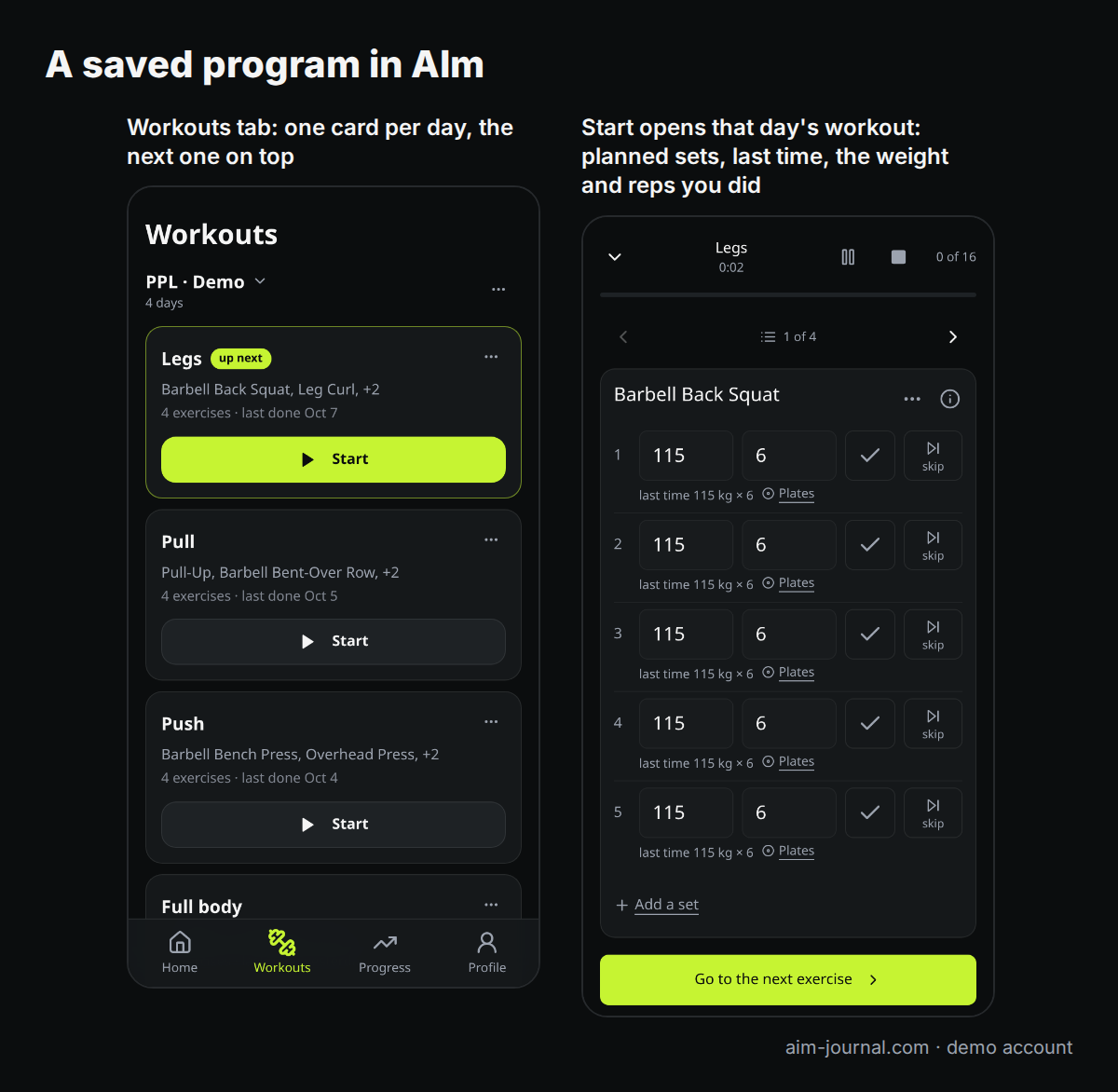
- Open AIm. The program is on the Workouts tab, one card per day.
What to check before you say yes
The assistant reads the plan; you are the one who knows what it meant. These are the places a transfer goes wrong:
| Check | Why |
|---|---|
| Units | AIm stores weight in kilograms. A plan written in pounds has to be converted, so compare two or three numbers against the original. |
| Dumbbell weight | AIm counts the weight of one dumbbell. If the plan meant the pair, the number should be halved. |
| Each exercise is the one you meant | A lift should be matched to the same movement in the catalog, not to a similar one. If the assistant is unsure, it should ask rather than substitute. |
| Row count per day | Count the exercises on each day against the source. A line that wrapped in a PDF or sat in a merged spreadsheet cell is the one that goes missing. |
| Per leg and per side | 10 each leg is not 10 total. Make sure the note survived. |
| Missing weights | Should stay empty rather than be filled with a guess. The workout screen asks for the weight you actually used. |
For the sample plan, a correct preview looks like this:
| Day | Exercise | Sets x reps | Weight | Rest |
|---|---|---|---|---|
| A | Back squat | 3 x 5 | 60 kg | 3 min |
| A | Bench press | 3 x 5 | 50 kg | 3 min |
| A | Seated cable row | 3 x 10-12 | 40 kg | 90 s |
| A | Walking lunge | 2 x 10, each leg | 12 kg per dumbbell, after asking | 90 s |
| A | Hanging knee raise | 3 x 10-15 | none, bodyweight | 60 s |
| B | Romanian deadlift | 3 x 8 | 60 kg | 2 min |
| B | Overhead press | 3 x 6-8 | 30 kg | 2 min |
| B | Lat pulldown | 3 x 10-12 | 45 kg | 90 s |
| B | Goblet squat | 3 x 12 | empty, entered during the workout | 90 s |
What you get in AIm
The saved program appears on the Workouts tab as a card for each day, with the day that is next in your plan on top. Tap a card to see every exercise with its sets, reps, weight and rest. Start opens the workout screen: each exercise with its target and, once there is a record of it, what you did last time; a field for the weight and reps you actually did (where the empty goblet squat weight gets filled in); and a rest timer from your plan after each marked set. A summary closes the workout, and saving puts the session in your history, the Progress tab and the log your assistant reads.
From then on the assistant can plan the next session from what you logged against this program, in any new conversation.
When the plan is incomplete, or replaces another
Missing sets or reps. The program is still saved, but as paused, with a list of what is missing. A paused program is not shown as your current one and the workout screen will not start a day it cannot describe. Give the assistant the missing numbers and ask it to save the program again.
You already have a program. When moving a program you already train on, the assistant has to read your current program first and quote it back when it saves the new one. If it skips that step, AIm refuses the import and nothing is written. If the program changed since the assistant read it, from another chat or another device, the import is refused as well, so an approval you gave for one situation is never applied to another.
What happens to the old one. It is archived when the new program is saved complete. A paused import leaves your current program running. Your logged workouts are never deleted by importing a program.
A plan is not a history
Importing a program and importing past workouts are two different jobs, and they are best done as two separate requests.
| Program | History | |
|---|---|---|
| What it is | What you intend to do: days, exercises, targets | What you did: dates, sets, reps, weights |
| Typical source | A plan from a chat, a coach's PDF, a spreadsheet | An export from another app, a training diary, notes |
| Where it shows up | The day cards on the Workouts tab | History, Progress and your records |
| The main risk | A changed exercise or a lost row | Wrong dates, duplicated workouts, invented numbers |
For a history, the same sheet has a second choice, Move my training history, with its own request text. It asks the assistant to show the date range and the number of workouts first, to leave missing numbers missing, and to move the file in batches. Each batch gets its own id, and sending the same batch again after a lost reply writes nothing. Records from the same export that were already imported are reported as matched rather than saved twice.
That duplicate protection works on the record ids in a file. A history typed from memory or copied from notes has no such ids, so ask the assistant to compare dates with what is already in AIm before it saves. Workouts recorded on the AIm workout screen cannot be overwritten by an import at all; the assistant is told to correct them instead.
What importing cannot do
- There is no built-in CSV or PDF uploader. Your assistant reads the plan, a file or pasted text, so reading mistakes are possible, which is why the preview step exists.
- A structure the program fields cannot hold stays a note. An instruction like 75 percent of your max belongs in the note on that exercise, and stays text until you give the assistant a weight in kilograms.
- The workout screen may refuse an unusual day. If a day mixes structures it cannot represent honestly, it says so instead of reshaping your plan.
- Very long files go better in parts. A year of history is easier to check in monthly batches than in one reply.
Paste the prompt into Claude or ChatGPT. Create your journal below to keep your program and workout results.Create my journal
Frequently asked questions
Can I import a workout plan from ChatGPT into an app?
Yes. Connect AIm to ChatGPT (Install plugin on AIm's page in its plugin directory) or to Claude, then ask the assistant to move the plan into AIm. It shows you what it parsed, asks about anything unclear, and saves after you confirm.
Does AIm have an import button for PDF or CSV files?
No. The file goes to your assistant, which reads it and sends AIm a structured program or history. The app gives you the request to paste, under Ask the AI on the Workouts tab or, once you have a program, under its name, not a file picker.
My plan is in pounds. Will it work?
Yes, but AIm stores kilograms, so the assistant converts the numbers. Check two or three of them against the original before you confirm.
What if the plan has no weights?
The program is saved without them. On the workout screen you enter the weight you actually used, and from then on the assistant has a real number to plan from.
Will importing a new plan delete my old workouts?
No. Importing a program never deletes logged workouts. The previous program is archived when the new one is saved complete.
Can I bring my history from Hevy, Strong or a spreadsheet?
Yes, as a separate history import: export the file from the other app, give it to the connected assistant with the history request from AIm, and check the date range and a few workouts before it saves. Moving from a Project with a system prompt is covered in Claude personal trainer prompt.